
Font
Font is the facade for text — the single place you load fonts, measure strings, and draw text. It is a global singleton like Input: no instances, no wiring. It loads two very different kinds of font:
- Bitmap fonts — an image sliced into glyphs, drawn with scaling, tinting, and alignment built in.
- Native fonts —
.ttf/.otf/.wofffiles registered with the browser, drawn with the standard canvas text methods.
import { Font } from "jygame";

// Bitmap — the engine draws it for you:
const ink = await Font.load("Ink", {
  image: "ink.png",
  characters: "ABCDEFGHIJKLMNOPQRSTUVWXYZ0123456789.!? ",
  gridX: 16,
  gridY: 4,
});
ink.render(ctx, "Score: 100", 10, 60, { color: "#ffcc00", scale: 2 });

// Native — drawn with the canvas text API:
const pixel = await Font.load("Pixel", "pixel.ttf");
pixel.render(ctx, "Score", 10, 30, { color: "#ffffff", size: 24 });
Everything is cached by name — loading the same font twice returns the same object, no second fetch. Which kind a name refers to is fixed once loaded; the returned object exposes kind ("bitmap" or "native").
Font.load(...)
The same call handles both kinds. Give a name + a path for a native font, or a name + a config for a bitmap font. All forms return the cached font on repeat calls.
Native — load(name, path)
const font = await Font.load("Pixel", "pixel.ttf");Loading registers the family with the browser (awaiting its FontFace load), so after the await, the font is ready to measure and draw — no extra readiness step. The returned NativeFont is a thin descriptor:
| Member | Type | Meaning |
|---|---|---|
name | string | The registry key you loaded it under |
kind | string | "native" |
family | string | The font family name (= name) — the value used in ctx.font |
render(ctx, text, x, y, opts?) | Draw text at (x, y) on a 2D context | |
measure(text, opts?) | { width, height } in pixels | |
capabilities | { glyph, raster } | { glyph: false, raster: true } — which retained Text render modes this font supports |
A native font can also be used with the canvas API directly — ctx.font = "24px Pixel" then ctx.fillText(...) — or through font.render(), which sets up the canvas state for you. Both draw with the same family name.
Bitmap — load(name, config)
Loads an image and slices it into glyphs. The config names the image, the character set (in glyph order), and one slicing strategy:
const ink = await Font.load("Ink", {
  image: "ink.png",
  characters: "ABCDEFGHIJKLMNOPQRSTUVWXYZ0123456789.!? ",
  gridX: 16,          // 16 columns…
  gridY: 4,           // …and 4 rows of glyphs
});| Option | Type | Default | Meaning |
|---|---|---|---|
image | string | — | Path to the glyph image (required) |
characters | string | — | Every glyph, in the order they appear in the image (required) |
gridX / gridY | number | — | Slice the image into a uniform gridX × gridY grid; cell size = image ÷ grid |
separator | string | — | A color (#RGB, #RRGGBB, rgb()/rgba()) marking vertical glyph dividers |
spacing | number | 0 | Extra horizontal advance after every glyph |
spaceWidth | number | widest glyph | Advance for the space character |
background | string | — | A color (#RGB, #RRGGBB, rgb()/rgba()) treated as transparent — a chroma key for fonts with an opaque background |
colors | string | string[] | — | The glyph body color(s) that render()'s color tint replaces; every other pixel (shadows, outlines, bevels) is left untouched |
caseInsensitive | boolean | false | When rendering, fall back to the other case if a character has no glyph |
Exactly one slicing strategy is required — gridX/gridY or separator. Both, neither, or a single grid axis throw a descriptive error.
Separator slicing
A vertical line of the separator color divides glyphs, like a sprite sheet separated by colored gutters. The engine finds the content bounds, splits at every separator column, and trims each glyph to its opaque pixels — so glyphs of different widths work naturally. The number of glyphs found must equal characters.length.
Here's a real example — font.png, one old-style row of red glyphs sitting on an opaque black background, divided by rgb(127, 127, 127) gutters:

const font = await Font.load("Sep", {
  image: "font.png",
  characters: "ABCDEFGHIJKLMNOPQRSTUVWXYZ0123456789.?!,[]:",
  separator: "#7F7F7F",   // the gray gutters between glyphs
  background: "#000000",  // the font's opaque background, treated as transparent
  caseInsensitive: true,  // "Hello, World!" renders from the uppercase-only set
  spacing: 2,             // extra pixels between glyphs
});

font.render(ctx, "Hello, World!", 350, 100, { scale: 3, color: "#ffe600" });
background lets you use older font images that have an opaque background instead of transparency. Its color is ignored during slicing (so it doesn't inflate glyph boxes) and cleared from each sliced glyph — so nothing draws as a black block, and render()'s color tinting hits only the actual glyph shape. caseInsensitive is for fonts that contain a single case: with it on, "Hello world" renders correctly from a characters set that only has "ABCDEFGHIJKLMNOPQRSTUVWXYZ0123456789.?!,[]:".
Because these glyphs are trimmed tight to their opaque pixels — no extra margin or transparent space around each one — spacing is what adds the gap between them. That's the spacing: 2 in the example above.
Grid slicing
The image is a uniform grid. characters are assigned left → right, top → bottom, and must fit within gridX × gridY cells:
Here's a real grid font — grid.png, a 10 × 11 grid of 12 × 12 cells covering the full 110-character set:
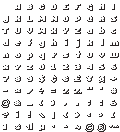
Source: Hello My Old Friend by lotovik.
const font = await Font.load("spr", {
  image: "grid.png",
  characters: " ABCDEFGHIJKLMNOPQRSTUVWXYZabcdefghijklmnopqrstuvwxyz0123456789$¢€£¥¤+-*/÷=%‰\"'#@&_(),.;:¿?¡!\\|{}<>[]§¶µ`^~©®™",
  gridX: 10,
  gridY: 11,
  colors: "#FFFFFF"
});

font.render(ctx, "Hello, World!", 350, 100, { scale: 3, color: "#ffe600" });
colors is for fonts whose glyphs carry shading (a drop shadow, an outline, a bevel). By default tinting recolors every opaque pixel, which would flatten the shading into a solid shape — listing the glyph body's colors instead tells the engine exactly which pixels to touch, so the shading survives tinting no matter how many colors it uses. A single color can be given as a bare string (colors: "#FF0000") instead of an array.
Batch loading
All three batch forms resolve to an object of fonts keyed by name (via a LoadingTask, like Image/Audio):
// Native batch — { name: path }:
const fonts = await Font.load({
  ui:   "ui.ttf",
  big:  "big.otf",
});

// Bitmap batch map — { name: config }:
const fonts = await Font.load({
  ui:    { image: "ui.png",    characters: "…", gridX: 16, gridY: 4 },
  title: { image: "title.png", characters: "…", separator: "#FF00FF" },
});

// Bitmap batch array — [config, …]:
const fonts = await Font.load([
  { name: "ui",    image: "ui.png",    characters: "…", gridX: 16, gridY: 4 },
  { name: "title", image: "title.png", characters: "…", separator: "#FF00FF" },
]);
A batch map must be all paths (native) or all configs (bitmap) — mixing them throws. A single bitmap config may also be passed directly with a name inside it:
const ink = await Font.load({
  name: "Ink",
  image: "ink.png",
  characters: "…",
  gridX: 16,
  gridY: 4,
});
A LoadingTask exposes promise, progress (0–1), loaded, total, and onProgress(cb).
Drawing with a bitmap font
A BitmapFont draws and measures itself:
| Member | Type | Meaning |
|---|---|---|
name | string | The registry key |
kind | string | "bitmap" |
render(ctx, text, x, y, opts?) | Draw text at (x, y) on a 2D context | |
measure(text, opts?) | { width, height } in pixels |
render() options:
| Option | Type | Default | Meaning |
|---|---|---|---|
scale | number | 1 | Multiply every glyph's size and advance |
color | string | — | Tint the glyphs (any CSS color). Opaque source pixels become this color |
align | string | "left" | "left", "center", or "right" |
const ink = await Font.load("Ink", { /* … */ });

ink.measure("Score 100");              // { width: 72, height: 8 } at scale 1
ink.render(ctx, "Score 100", 10, 60, { scale: 2 });              // 2× size
ink.render(ctx, "GAME OVER", 160, 60, { align: "center", color: "#ff0000" });
measure(text, { scale }) mirrors render()'s geometry, so centering and right-aligning are exact. Characters missing from the image are skipped (their advance still applies), and the space advance comes from spaceWidth or the widest glyph.
Drawing with a native font
A NativeFont draws and measures itself with the same options shape a bitmap font uses, plus a font size:
| Option | Type | Default | Meaning |
|---|---|---|---|
size | number | 16 | Font size in pixels |
scale | number | 1 | Multiply the size (final px = size × scale) |
color | string | "#000000" | Text color (any CSS color) |
align | string | "left" | "left", "center", or "right" |
baseline | string | "top" | Canvas textBaseline for render() |
const pixel = await Font.load("Pixel", "pixel.ttf");

pixel.render(ctx, "Hello", 10, 40, { color: "#ffffff", size: 24 });
pixel.measure("Hello", { size: 24 });     // { width, height } in pixels
render() sets ctx.font from the family and size, then draws with fillText. If you'd rather drive the canvas yourself, the same family works directly: ctx.font = "24px Pixel"; ctx.fillText(...).
Bitmap glyphs
A bitmap font's glyphs are regions — the same region shape sprite frames use — paired with the metrics needed to place them. You rarely need them; they exist for custom per-glyph drawing:
const glyph = font.glyph("A");   // { region, advance, offsetX, offsetY }

glyph.region;   // { sourceImage, sx, sy, sw, sh } — what to draw and where to cut it
glyph.advance;  // how far the next glyph moves — includes the font's `spacing`
glyph.offsetX;  // horizontal offset of the glyph box from the advance cursor
glyph.offsetY;  // vertical offset of the glyph box
font.glyph(ch) returns the same stable object every call (no allocation per call); font.getGlyph(ch) is the same accessor, and font.getTintedGlyph(ch, color) returns the same shape with the glyph body recolored. A glyph's region behaves like any sprite region, so you can hand it to anything that accepts an image.
Font.get / has / remove / clear
| Member | Behavior |
|---|---|
Font.get(name) | The loaded font, or null |
Font.has(name) | true if a font is loaded under that name |
Font.remove(name) | Removes the font (and unloads the native family); true if it existed |
Font.clear() | Removes every loaded font |
const ink = Font.get("Ink");   // null until loaded
if (Font.has("Ink")) { /* … */ }