
Image
Image is the asset facade for textures. It does three things: load image files and cache them, slice them into named animation clips — from a folder of numbered files, a sprite sheet, a packed atlas, or a TexturePacker JSON — and collect regions of a single image into an atlas. Both slicing and collection are one-liners that resolve to plain data your sprites can use:
import { Image } from "jygame";

const img = await Image.load("hero", "assets/hero/hero.png");
const anims = await Image.animate({
  name: "hero",
  path: "assets/hero",
  idle: 4,   // assets/hero/idle/1.png … 4.png
  run: 4,    // assets/hero/run/1.png … 4.png
});
Everything is cached: loading the same path or name twice returns the same object, no second request. The facade is a global singleton like Input — no instances, no wiring.
Loading images — Image.load(...)
Loads one or more images and returns an HTMLImageElement per asset.
Single image — load(path)
const img = await Image.load("assets/tiles.png");The promise resolves to the decoded HTMLImageElement. Hand it straight to a sprite: sprite.image = img, or new Sprite(x, y, img).
Named image — load(name, path)
Registers the image under a name as well as its path, so you can refer to it without remembering URLs:
await Image.load("player", "assets/hero/hero.png");
sprite.image = Image.get("player");
Batch — load({ name: path, ... })
Loads many images at once and resolves to an object keyed by name:
const atlas = await Image.load({
  tiles: "assets/tiles.png",
  player: "assets/hero/hero.png",
  enemy: "assets/goblin/goblin.png",
});
sprite.image = atlas.tiles;
The batch returns a LoadingTask — await it like a promise, or read its progress for a loading bar:
const task = Image.load({ tiles: "...", player: "..." });
task.onProgress((loaded, total) => {
  bar.style.width = (loaded / total * 100) + "%";
});
const atlas = await task;
A LoadingTask exposes promise (the underlying promise), progress (0–1), loaded, total, and onProgress(cb), which returns an unsubscribe function.
Caching
Images are cached forever — by path and by name. A second load() for the same key is a no-op that resolves to the already-loaded element. To drop entries, use cache management.
A failed load rejects with Error: Failed to load image: <path>.
Options
Both forms accept an optional options object as their last argument:
await Image.load("ui", "assets/ui.png", { decode: false });| Option | Type | Default | Meaning |
|---|---|---|---|
decode | boolean | true | Await the browser's image.decode() after load. Set false to return as soon as the bytes arrive; rendering may briefly defer while the image decodes. |
Animating images — Image.animate(config)
Builds a set of named animation clips from one config object. The engine picks a strategy from the shape of the config:
| Config has | Strategy |
|---|---|
path | Individual files — a folder of numbered PNGs per animation |
image + json | JSON atlas — TexturePacker sheet + data file |
sliceX/sliceY | Sprite sheet — one image cut into a uniform grid |
image (anything else) | Atlas regions — named rectangles cut out of one image |
const anims = await Image.animate({ image: "run.png", sliceX: 4, sliceY: 1, run: 4 });It resolves to an animation set: a plain object mapping clip names to AnimationClips.
anims.run; // { frames: [...], fps: 8, loop: true, frameCount: 4, ... }Every clip exposes:
| Member | Type | Meaning |
|---|---|---|
frames | array | The frame sources: { sourceImage, sx, sy, sw, sh } — what to draw and where to cut it from |
fps | number | Frames per second (default 8) |
loop | boolean | Whether it repeats (default true) |
frameCount | number | Number of playback positions in the clip |
frameDuration | number | 1 / fps |
duration | number | Total length in seconds (frameCount / fps, or the sum of timing when present) |
timing | array | Per-playback-position durations, or null for uniform fps |
markers | object | Marker name → playback position, or null |
frameDurationAt(i) | number | Duration of playback position i (timing[i], else 1 / fps) |
timeAt(i) | number | Start time of playback position i on the timeline |
frameAt(elapsed, wrap) | number | Playback position at a cumulative time in seconds; wraps when wrap is true |
If the config has a name, the set is registered so a sprite can adopt it. Either way, animate() resolves to the set itself, so you can use the returned object directly.
Common clip options
Every animation entry accepts the same playback options; the defaults can be overridden for the whole config with a defaults block.
Image.animate({
  image: "hero.png",       // 64×32 px, two rows of 16×16 cells
  sliceX: 4,               // 4 cells per row
  sliceY: 2,               // 2 rows → 8 cells, numbered 0–7 row by row
  defaults: { fps: 12 },
  run: { row: 1, frames: 4 },          // row 1 → cells 4, 5, 6, 7
  idle: { row: 0, frames: 2, fps: 6 }, // row 0 → cells 0, 1; slower
});| Option | Type | Default | Meaning |
|---|---|---|---|
fps | number | 8 | Playback speed, frames per second |
loop | boolean | true | Repeat forever; when false the clip plays once and holds its last frame |
pingPong | boolean | false | Play forward, then backward — a 3-frame clip becomes 4 (1 2 3 2) |
sequence | array | — | Reorder the animation's own frames for playback; each value is a source-frame index (see Timeline) |
timing | array | — | Per-playback-position durations in seconds; must match the playback length exactly |
markers | object | — | { name: playbackPosition } synchronization points on the playback timeline |
crop | object | null | Shave pixels off each frame: { left, top, right, bottom } |
defaults supplies the fallback for fps, loop, pingPong, and crop across every clip in the config.
Timeline: sequence, timing, and markers
An animation is a timeline, not just a list of frames. Three optional options refine how that timeline is built:
| Option | Answers | Default |
|---|---|---|
sequence | which frames play, in what order | identity — the extracted frames, in order |
timing | how long each playback position lasts | uniform 1 / fps |
markers | semantic names for positions on the timeline | none |
sequence reorders the extracted frames. Indices refer to the animation's own frame list, so a 3-frame slash can play 1, 0, 1, 2 — an extra preparation frame — without any extra images:
slash: {
  frames: 3,
  sequence: [1, 0, 1, 2],   // source 0 1 2 → playback 1 0 1 2
}
sequence: [0, 1, 2, 1, 0] deliberately reuses frames for the return, and [0, 1, 2, 2, 2, 3] holds a pose by repeating a position. Repeats are legitimate — each repeated position is still a distinct point on the timeline.
timing gives each playback position its own duration. This holds a pose without changing the clip's FPS or duplicating frames:
jump: {
  frames: 5,
  timing: [0.08, 0.08, 0.50, 0.10, 0.12],  // the airborne pose lasts 0.5s
}
timing must have exactly one value per playback position (after sequence/pingPong are applied), and each value is in seconds. Without timing, every position lasts 1 / fps as before.
markers name positions on the playback timeline so gameplay can sync with the animation without knowing frame numbers. Markers are indexed against the normalized playback sequence — never source-frame indices:
jump: {
  frames: 5,
  sequence: [0, 1, 2, 3, 4],
  timing: [0.08, 0.08, 0.20, 0.40, 0.08],
  markers: { airborne: 2, landing: 4 },
}
The three options compose: sequence sets the structure, timing sets the pacing, and markers name the meaningful points. See Marker-driven playback for how gameplay uses them.
From individual files
A folder of sequentially numbered images per animation. Give path as the base folder and one entry per animation — a frame count, or an object for finer control:
const anims = await Image.animate({
  path: "assets/hero",
  idle: 4,            // assets/hero/idle/1.png … 4.png
  run: { from: 1, to: 6 },          // assets/hero/run/1.png … 6.png
  walk: { frames: 4, padding: 3 },  // assets/hero/walk/001.png … 004.png
});
By default each animation lives in its own subfolder named after it, with one file per frame:
assets/
└── player/
    ├── idle/                ← plain numbered frames
    │   ├── 1.png
    │   └── 2.png
    └── run/                 ← files prefixed with the animation name
        ├── run_1.png
└── run_2.pngconst anims = await Image.animate({
path: "assets/player",
idle: 2, // assets/player/idle/1.png, 2.png
run: { frames: 2, prefix: "run_" }, // assets/player/run/run_1.png, run_2.png
});Each file is <prefix><number><suffix>.png, numbered from 1. The number is padding-digit zero-padded (default 0 → no padding); prefix/suffix wrap it in the filename (idle_1.png, 1_walk.png, …).
Flat folders — the single-number shortcut
Usually a folder holds one animation per subfolder, but sometimes it holds a single animation's frames directly:
assets/
└── King/
    ├── 1.png
    ├── 2.png
    ├── 3.png
    └── 4.png
When the config has exactly one entry given as a plain number, the engine reads the files flat in path — no subfolder. The entry's name becomes the clip name, so you can call it anything:
Image.animate({ path: "assets/King", walk: 4 });
// clip is named "walk", playing assets/King/1.png … 4.png
You usually want this when you're going to hand the set to a sprite and drive it by clip name:
const king = new Sprite(300, 300, "king");
king.animation.play("walk");
Without the shortcut you'd be forced to make the layout match the clip name. Pointing at a flat folder named after the character, you'd have to write king: 4 — the clip would be called "king", so king.animation.play("king") reads oddly. Renaming the folder to assets/walk makes no sense for a character. The usual fix is the per-animation subfolder — assets/king/walk/1.png … — which is better architecture and scales as the character gains idle, run, jump, and so on. The flat shortcut exists so you can keep the simple assets/King folder and call the clip "walk".
The shortcut is single-animation. It only fires for exactly one entry that is a plain number — from a flat folder you get to name that one clip. More than one entry (or object entries) always goes back to one subfolder per animation:
walk: 4, idle: 2fromassets/kingexpectsassets/king/walk/…andassets/king/idle/…. Keep one animation per flat folder, or give each animation its own subfolder.
Per-entry options:
| Option | Type | Default | Meaning |
|---|---|---|---|
frames | number | — | How many frames to load |
from / to | number | — | A numbered range of files, inclusive. { from: 3, to: 6 } loads 3.png … 6.png |
padding | number | 0 | Zero-pad the frame number (3 → 001) |
prefix | string | "" | Text before the number in the filename |
suffix | string | "" | Text after the number |
extension | string | "png" | File extension |
folder | string | the animation name | Subfolder under path; "." means no subfolder |
fps, loop, pingPong, sequence, timing, markers | see common options |
From a sprite sheet
One image cut into a uniform grid. Here's a real one — Cow.png, 64×64, with four 32×32 frames packed in two rows:

Source: Cute Fantasy RPG by Kenmi.
const anims = await Image.animate({
  image: "/Cow.png",   // 64×64
  sliceX: 2,           // 2 columns → 32 px wide cells
  sliceY: 2,           // 2 rows    → 32 px tall cells
  walk: 4,             // all four frames, left-to-right then top-to-bottom
});
Frames are read left to right, top to bottom. A plain number takes that many frames starting at the sheet's origin.
| Option | Type | Default | Meaning |
|---|---|---|---|
sliceX / sliceY | number | — | Divide the image into this many columns / rows; cell size = image size ÷ slice |
frameWidth / frameHeight | number | image ÷ slice | Explicit cell size instead of slices |
columns | number | sliceX | Cells per row; a run that reaches the end of a row wraps to the next |
margin | number | 0 | Padding around the whole grid |
spacing | number | 0 | Gap between cells |
Per-entry options:
| Option | Type | Meaning |
|---|---|---|
frames | number | How many frames to take |
from / to | number | A run of to - from + 1 frames starting at column from of the entry's row (default 0); wraps to the next row at columns |
row / column | number | The starting cell — row is the sheet row, column the cell within it |
fps, loop, pingPong, crop, sequence, timing, markers | see common options |
// cells are numbered row by row: 0, 1 (top), then 2, 3 (bottom)
Image.animate({
  image: "/Cow.png", sliceX: 2, sliceY: 2,
  run: { from: 2, to: 3 },   // just the bottom row — cells 2 and 3
});
A real multi-character sheet
Here's a bigger, real-world example that pulls the options together. characters.png is 736×128 — 23 columns × 4 rows of 32×32 cells. Each row is a character with several animations packed in one row, except the bottom one: a snake with only a 4-frame walk, after which the row is empty.

Source: A Platformer in the Forest by Buch (CC0).
const anims = await Image.animate({
  image: "/characters.png",
  frameWidth: 32,
  frameHeight: 32,
  columns: 23,                       // ← required, see below
  // row 0 — the king
  "king.walk":  { row: 1, from: 0, to: 3 },    // frames 1–4
  "king.jump":  { row: 1, from: 4, to: 7 },    // frames 5–8
  "king.hit":   { row: 1, from: 8, to: 9, pingPong: true }, // 9, 10, 9
  "king.slash": { row: 1, from: 10, to: 12 },  // frames 11–13
  "king.run":   { row: 1, from: 14, to: 17 },  // frames 15–18
  "king.climb": { row: 1, from: 18, to: 21 },  // frames 19–22
  // row 3 — the snake, a single 4-frame walk
  "snake.walk":   { row: 3, from: 0, to: 3 },
});
What it teaches:
columnsis mandatory when you size cells explicitly.frameWidth/frameHeighttell the engine how big each cell is, but not how wide the row is — that only comes fromsliceXorcolumns. Withoutcolumns: 23, the grid would collapse to one column wide and every run would march straight down the sheet's left edge.rowpicks the character. Each row is addressed withrow, andfrom/toselects the animation inside it (0-based, wrapping atcolumns).pingPongreproduces a "return to first frame" pattern. The sheet's HIT is frames 9, 10, 9 — a 2-frame run withpingPongplays exactly that.- Empty cells are fine. The snake's unused frames are simply never referenced.
from/toonly reads the runs you ask for; nothing else is touched.
You don't have to pull the whole sheet. The same characters.png can feed several named sets, each pulling only the row (and animations) it needs. Want just the snake? Give the set a name, point at the sheet, and pick its row:
const snakeAnims = await Image.animate({
  name: "snake",               // register the set under "snake"
  image: "/characters.png",
  frameWidth: 32,
  frameHeight: 32,
  columns: 23,
  walk: { row: 3, from: 0, to: 3 },   // only the snake's walk
});

const snake = new Sprite(100, 100, "snake");  // name string → adopts the set
snake.animation.play("walk");
Because the set only contains the snake's clips, the clip names are the plain walk, jump, … — no "snake." prefix needed. The other rows are never loaded into this set; the king's row can go into its own name: "king" set the same way.
From atlas regions
One packed image and a named rectangle per animation. The rectangle can be a region (divided evenly into frames), a grid within a region, or an explicit list of frame rects:
const anims = await Image.animate({
  image: "atlas.png",
  walk: { x: 0, y: 0, width: 64, height: 16, frames: 4 },        // four 16×16 cells
  run: { x: 0, y: 16, width: 48, height: 16, frameWidth: 16, frameHeight: 16, frames: 3 },
  jump: { frames: [[0, 32, 16, 16], [16, 32, 16, 16]] },         // exact rects
  shoot: { frames: [{ x: 32, y: 32, w: 16, h: 16 }] },           // object form
});| Entry form | Meaning |
|---|---|
{ x, y, width, height, frames } | Divide the region into frames equal cells, left to right |
{ x, y, width, height, frames, frameWidth, frameHeight } | A grid of explicit cell size inside the region |
{ frames: [[x, y, w, h], …] } | Each frame's exact rect, in order (tuple form) |
{ frames: [{ x, y, w, h }, …] } | Same, object form |
fps, loop, pingPong, crop, sequence, timing, and markers apply per entry as usual.
From a JSON atlas (TexturePacker)
A packed sheet plus its JSON data. Both the Hash format (frames: { name: {...} }) and the Array format (frames: [{ filename, frame }]) are supported.
const anims = await Image.animate({
  image: "atlas.png",
  json: "atlas.json",
  idle: { prefix: "char_idle" },   // every frame whose name starts with "char_idle"
  run: 4,                          // shorthand for { prefix: "run" }
});
Each entry names the animation and, optionally, a prefix to match frames by. Matched frames are ordered by the trailing number in their name, so char_idle_0001 … char_idle_0008 play in the right order. The default prefix is the animation's own name.
| Option | Type | Default | Meaning |
|---|---|---|---|
prefix | string | the animation name | Match frames whose packed name starts with this |
fps, loop, pingPong, crop, sequence, timing, markers | see common options |
If no frame matches a prefix, animate() rejects with an error naming the missing prefix.
Building atlases — Image.atlas(config)
Image.atlas() creates a collection of image regions from one source image. This is a different question than animate():
Image.animate()creates animation clips — how assets play over time.
Image.atlas()creates collections of image regions — where assets live.
An atlas is an ordered collection of assets (cards, icons, UI elements, tiles, portraits), not necessarily animation frames. Each region is a lightweight view into the single source image — no copied images, no per-region textures.
The examples below use Kenney's Playing Cards Pack — a 896×256 sheet of 14 columns × 4 rows of 64×64 cards:
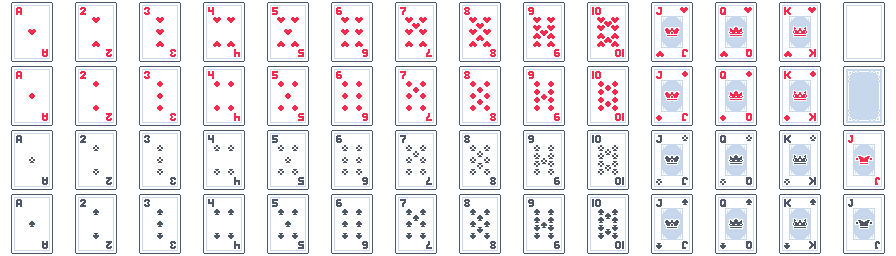
Source: Playing Cards Pack by Kenney.
The result behaves like an array, so indexed access, iteration, and destructuring are natural:
const cards = await Image.atlas({
  image: "cards.png",
  grid: {
    columns: 14,
    rows: 4,
    width: 64,
    height: 64,
  },
});

const card = cards[0];      // top-left card
const another = cards[27];  // direct index
Grid regions are ordered left → right, top → bottom:
cards[0]   // top-left
cards[13]  // top-right (row 1)
cards[14]  // first card of row 2
Grid layout
A uniform grid is described by a grid option. columns × rows regions are derived from the cell size. Optional origin, spacing, and margin offset the slicing:
const cards = await Image.atlas({
  image: "cards.png",
  grid: {
    columns: 14,
    rows: 4,
    width: 42,
    height: 60,
    origin: { x: 11, y: 2 },   // or margin: 11 for a uniform inset
    spacing: { x: 22, y: 4 },  // or spacing: 5 for a uniform gap
  },
});
Spacing is the gap between cells, not the distance between their left edges. The next cell starts at origin.x + i * (width + spacing.x). If width/height are omitted, they are derived from the image so that columns × rows cells tile it exactly:
// cards.png is 896×256; each cell becomes 64×64
const cards = await Image.atlas({
  image: "cards.png",
  grid: { columns: 14, rows: 4 },
});
The kenney cards sheet is exactly this case: 896×256, 64×64 cells with no gap, so the derived form is correct and needs no spacing/origin. If you want to trim the transparent border and slice the 42×60 face from each 64×64 cell, you must keep the pitch at 64 — that means spacing is 64 − 42 = 22 horizontally and 64 − 60 = 4 vertically, with origin at (11, 2). An off-by-one spacing (e.g. 23 instead of 22) shifts each successive cell one pixel to the right, so cards appear progressively cropped from the left — a good symptom to recognize as a pitch mismatch.
Grid options can also be given at the top level, without a grid object:
const cards = await Image.atlas({
  image: "cards.png",
  columns: 14,
  rows: 4,
});
Named regions
When an atlas has semantically meaningful regions, give them names. Named regions are indexed in declaration order, and each name is an alias to the same region object:
const ui = await Image.atlas({
  image: "ui.png",
  health: { x: 0, y: 0, width: 128, height: 16 },
  mana:   { x: 0, y: 16, width: 128, height: 16 },
  button: { x: 0, y: 32, width: 96, height: 32 },
});

ui.health;      // named access
ui[0] === ui.health;   // true — same underlying region
The strategy is inferred from the configuration: a grid option selects the grid strategy; any other top-level keys are treated as named regions. Mixed or ambiguous configs are rejected, as are names that would collide with native array behavior (map, filter, length, ...).
Atlas regions in sprites
Regions drop straight into anything that accepts an image:
const card = new Sprite(100, 100, cards[0]);   // full card
sprite.image = cards[12];                      // swap which card is shown
sprite.image = ui.health;                      // named works too
Regions share one source texture; the renderer draws only the x/y/width/height sub-rectangle (Canvas 2D via drawImage source rect, WebGL/WebGPU via UVs).
Named sets & sprites
Pass a name to animate() and the whole set is registered. A sprite constructed with that name string then picks up every clip automatically:
const skel1Anims = await Image.animate({
  name: "skel1",              // register the set under "skel1"
  path: "assets/skeleton1",   // assets/skeleton1/v1/1.png … and /v2/1.png …
  v1: 4,
  v2: 4,
});

this.skel = new Sprite(650, 322, "skel1");  // name string → adopts every clip
this.skel.animation.play("v1");
This is the whole loop for an animated character: load the set once, name it, build a sprite from the name, and drive it with sprite.animation.play("v1") — switching clips is just calling play() with another name from the set.
Animation playback
sprite.animation distinguishes what should normally be playing from temporary actions that take control. The controller owns playback, completion, and resumption — gameplay code just states intent.
| Operation | Meaning |
|---|---|
play(name) | Persistent request: "this is the normal animation". Safe to call every frame; calling it with the active name does not restart. |
playOnce(name) | Temporary one-shot that plays to completion and then resumes the latest persistent request. Never loops, even if the clip is configured to loop. |
playUntil(name, marker) | Plays the named clip and pauses exactly at the marker — see Marker-driven playback. |
playAfter(name, marker) | Plays the named clip starting at the position right after the marker. |
pauseAt(name, marker) | Arms the named (currently playing) clip to pause automatically when it reaches the marker. |
resumeAt(name, marker) | Positions the cursor at the marker and resumes playback from there. |
play(name, { force: true }) | Higher-priority animation (death, stun, hit) that cannot be interrupted by ordinary play(). Resumes the persistent request on completion unless { resume: false } holds the last frame. |
queue(name) | Plays after the current one-shot/queued animation. With nothing temporary active it starts immediately. |
clearQueue() | Drops pending queued clips; the currently playing one finishes, then normal playback resumes. |
pause() / resume() | Stop at the current playback position / continue exactly where playback stopped. resume() also clears any armed marker stop. |
stop() | Reset playback state (stops, rewinds to the first frame). |
isAt(name, marker) | Is the playback cursor exactly at the marker? |
hasReached(name, marker) | Has the cursor reached or passed the marker? |
onComplete(cb) | Fires once each time a finite playback reaches its end, with the completed clip name. |
Playback state is queryable through the facade — no ECS internals needed:
| Getter | Meaning |
|---|---|
current | Name of the clip owning playback |
frame / position | Current playback position on the normalized timeline |
progress | Normalized progress through the clip (timing-aware; 1 when a finite clip completes) |
isPlaying | Playback is actively advancing |
isPaused | Intentionally stopped with a resumable cursor |
isComplete | A finite playback genuinely completed — a marker stop is never complete |
marker | Marker name at the current position, or null |
play() vs playOnce()
update(dt) {
  // Persistent: keep issuing it every frame.
  king.animation.play(Input.down("move") ? "run" : "idle");

  // Temporary: trigger on the one-frame input edge; the controller
  // plays jump to completion, then resumes run/idle.
  if (Input.pressed("jump")) {
    king.animation.playOnce("jump");
  }
}
While the jump is playing, the play("run") / play("idle") requests keep updating in the background. When the jump finishes, the latest request takes over automatically.
Do not try to express a one-shot with play() on a single-frame input edge:
// Broken: pressed() is a one-frame event, so the animation reverts to
// run/idle on the very next frame. play() is persistent intent, not an action.
king.animation.play(Input.pressed("jump") ? "jump" : "walk");
Input.pressed() is a one-frame event, while play() means "this is the persistent animation". Use playOnce() for temporary actions.
Forced animations
if (enemyHit) {
  king.animation.play("hit", { force: true });   // resumes normal on completion
}
king.animation.play("death", { force: true, resume: false }); // terminal: holds last frame
Queues
if (Input.pressed("attack")) {
  king.animation.playOnce("attack1");
  king.animation.queue("attack2");
  king.animation.queue("attack3");
}
// attack1 → attack2 → attack3 → normal animation
Completion events
king.animation.playOnce("jump");
king.animation.onComplete((name) => {
  if (name === "jump") Audio.play("land");
});
The callback fires once per finite clip that ends — including each queued clip, in order. It fires after the controller has advanced, so calling play() / playOnce() from inside the callback cannot corrupt playback state.
Marker-driven playback
playUntil and pauseAt split an animation into semantic phases. The motivating example is a jump: play the anticipation and takeoff, pause at "airborne", and only continue when gameplay says so.
const anims = await Image.animate({
  image: "jump.png",
  sliceX: 5,
  sliceY: 1,
  jump: {
    frames: 5,
    timing: [0.08, 0.08, 0.20, 0.40, 0.08],
    markers: { airborne: 2, landing: 4 },
  },
});

// later, in gameplay:
update(dt) {
  if (Input.pressed("jump")) {
    if (king.animation.isAt("jump", "airborne")) {
      king.animation.resume();          // already airborne — finish the jump
    } else {
      king.animation.playUntil("jump", "airborne"); // 0 → 1 → 2, then PAUSED
    }
  }
  if (player.isFalling) {
    king.animation.resume();            // 2 → 3 → 4 → complete
  }
}
Markers are addressed explicitly by animation + marker — there is no global marker namespace, so the same name can exist in several clips without colliding and gameplay code stays self-documenting. playUntil plays the named clip and pauses exactly at the marker. The pause is detected even when a single dt would have jumped past it, and it is not completion:
onCompletedoes not fire,- queued animations do not advance,
- the persistent request is preserved,
so resume() continues from the exact paused position and only a genuine end of playback triggers normal completion/queue behavior.
pauseAt does not start a new animation — it arms the named clip that is currently playing:
king.animation.play("jump");
king.animation.pauseAt("jump", "airborne");  // keeps playing until the marker, then pauses
playAfter and resumeAt reposition the cursor directly on the timeline:
king.animation.playAfter("jump", "airborne"); // starts at the position after the marker
king.animation.resumeAt("jump", "landing");   // positions at the marker and resumes
playAfter("jump", "landing") when landing is the final position ends the animation without wrapping to frame 0. Positioning never fires onComplete.
isAt and hasReached let gameplay query where the cursor is: isAt is true only at the exact marker position (repeated source frames stay distinct), while hasReached stays true once playback has passed the marker, including after completion.
Cache management — get / has / remove / clear
| Member | Behavior |
|---|---|
Image.get(key) | The cached image for a name or path, or null |
Image.has(key) | true if a name or path is cached |
Image.remove(key) | Removes the image (and any animation set) under that name/path |
Image.clear() | Empties every cache |
const img = Image.get("player");   // null until loaded
if (Image.has("player")) { /* ... */ }